Automated Breakout Strategies for NinjaTrader 8 | BreakoutOS
Works with NinjaTrader

Breakout strategies for NinjaTrader.

Find the futures market with the right breakout structure, build a strategy without code, and paste it into NinjaTrader 8 as NinjaScript. Every strategy's tested in BreakoutOS before it reaches your chart.
Already have strategies? See the Scale tools ↓ New to NinjaTrader? Download it free
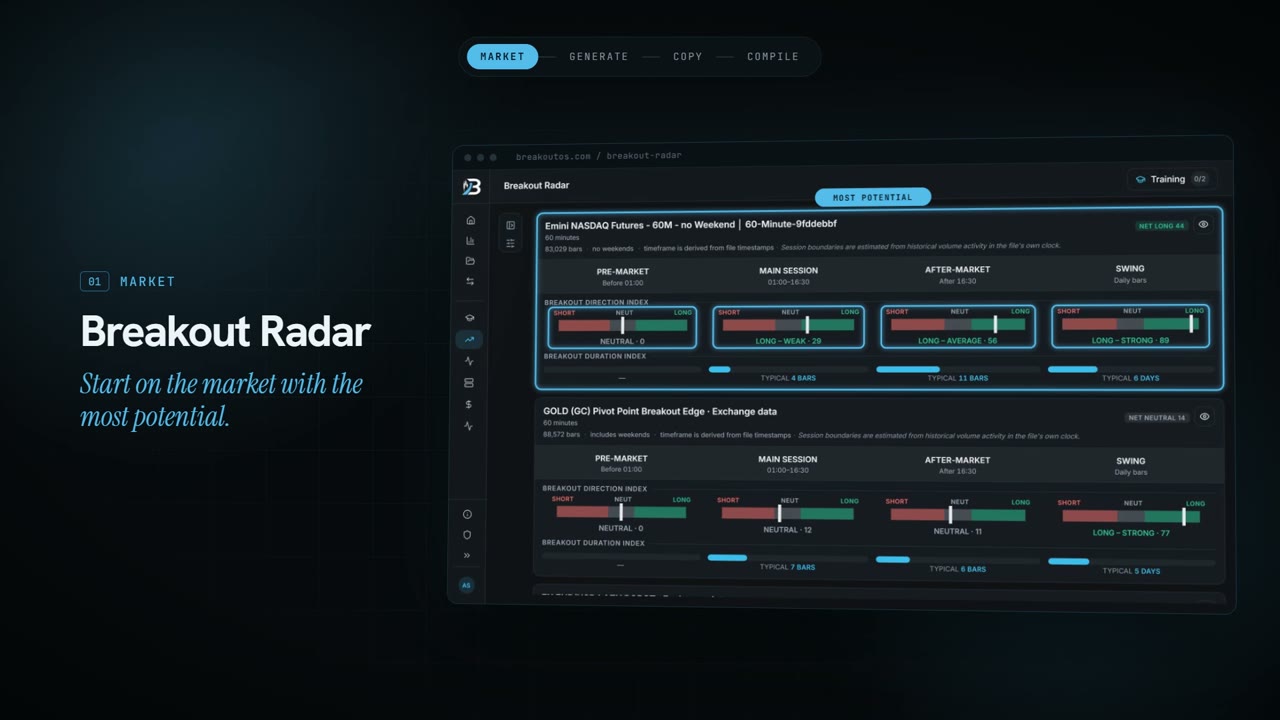
Breakout Radar scoring NASDAQ and gold by session

The creators of BreakoutOS have been featured on

Stocks & Commodities Traders.com Futures Truth Magazine Interactive Brokers Quantocracy Trading Nut Better System Trader Adaptrade Index Futures Group System Trader Success Against All Odds Traders' Magazine Striker Securities Consistent Profits Podcast Systems OnTheRoad Nordic Autotrading Society Česká televize
How it works

From market to NinjaScript in four steps.

The research happens in BreakoutOS. The finished strategy lands in NinjaTrader as code you can compile, backtest and run.
01Breakout Radar
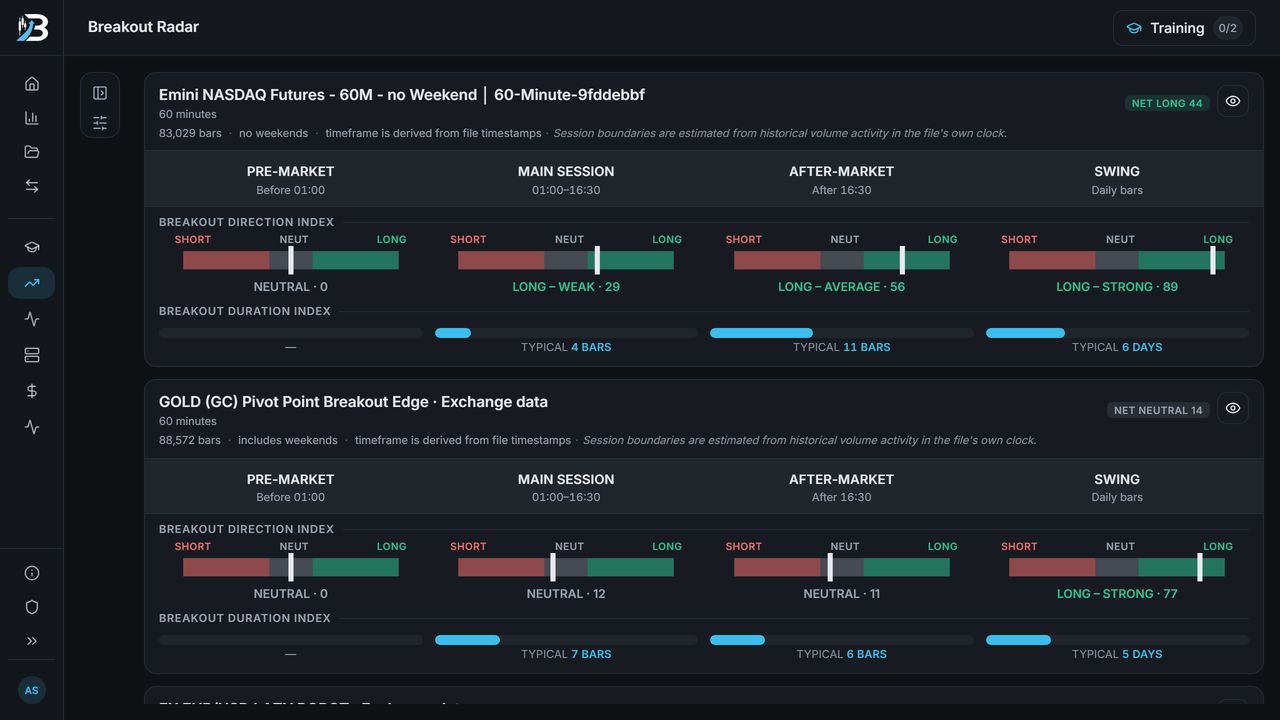
Breakout Radar scoring the E-mini NASDAQ and gold sessions

Pick a market

Breakout Radar scores each session of a market for breakout direction and how long breakouts typically last, so you start where the structure's there.
02Breakout Trading PRO
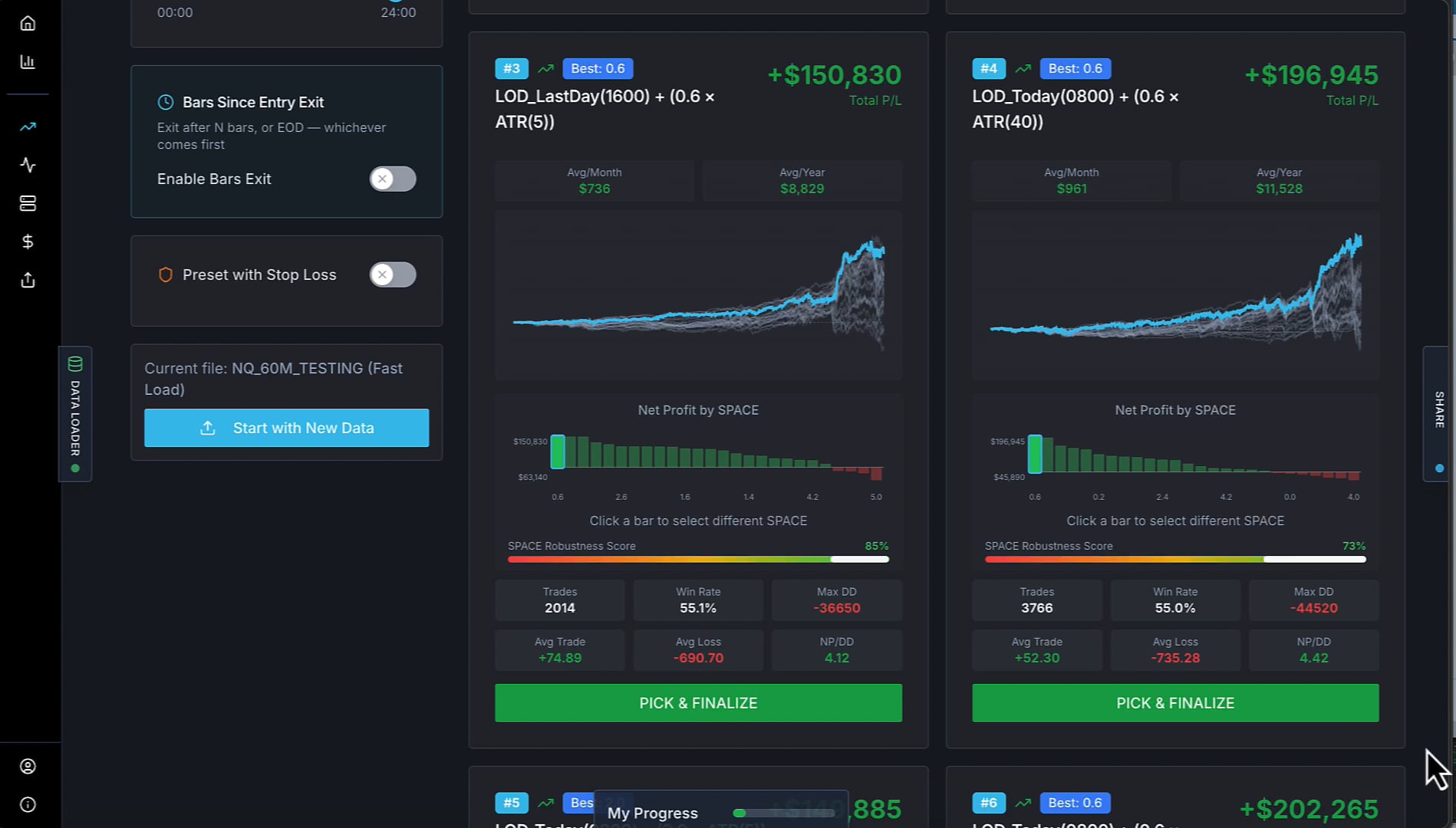
Breakout Trading PRO building and ranking breakout strategiesHypothetical backtest

Build the strategy

Breakout Trading PRO builds and tests breakout strategies for that market, point-and-click, using the Mr Breakouts Formula. Pick the one you want to take further.
03NinjaScript export
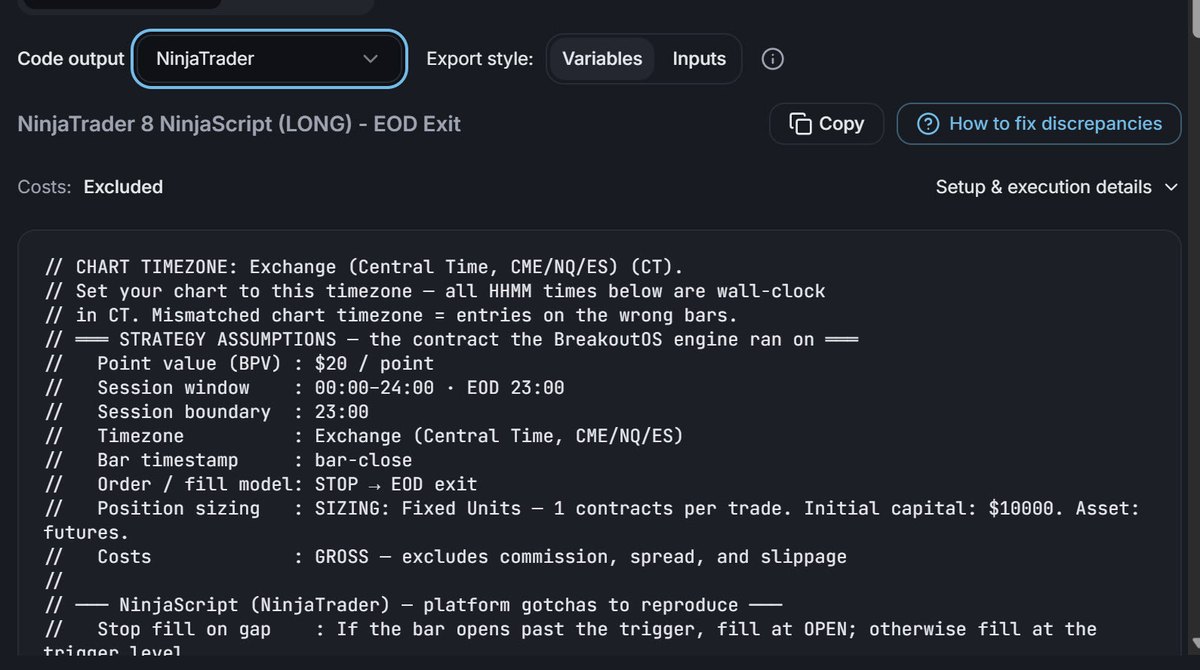
BreakoutOS NinjaScript export with the Copy button

Copy the NinjaScript

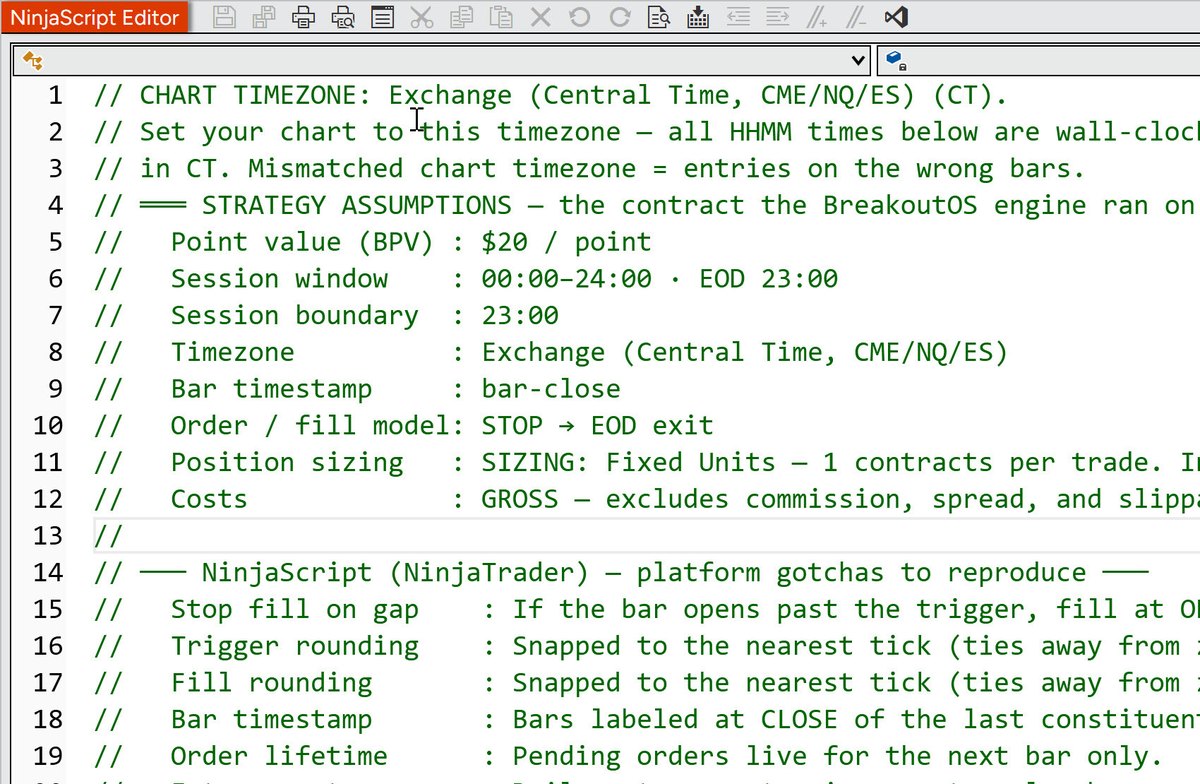
The export writes the strategy as NinjaTrader 8 NinjaScript (C#). The header tells you which chart timezone and session settings to match.
04NinjaTrader Desktop
The exported NinjaScript in NinjaTrader's NinjaScript Editor

Compile in NinjaTrader

Paste it into a new strategy in the NinjaScript Editor and compile. It's ready for the Strategy Analyzer or a chart, like any strategy you'd written yourself.

The proof

What you tested is what you trade.

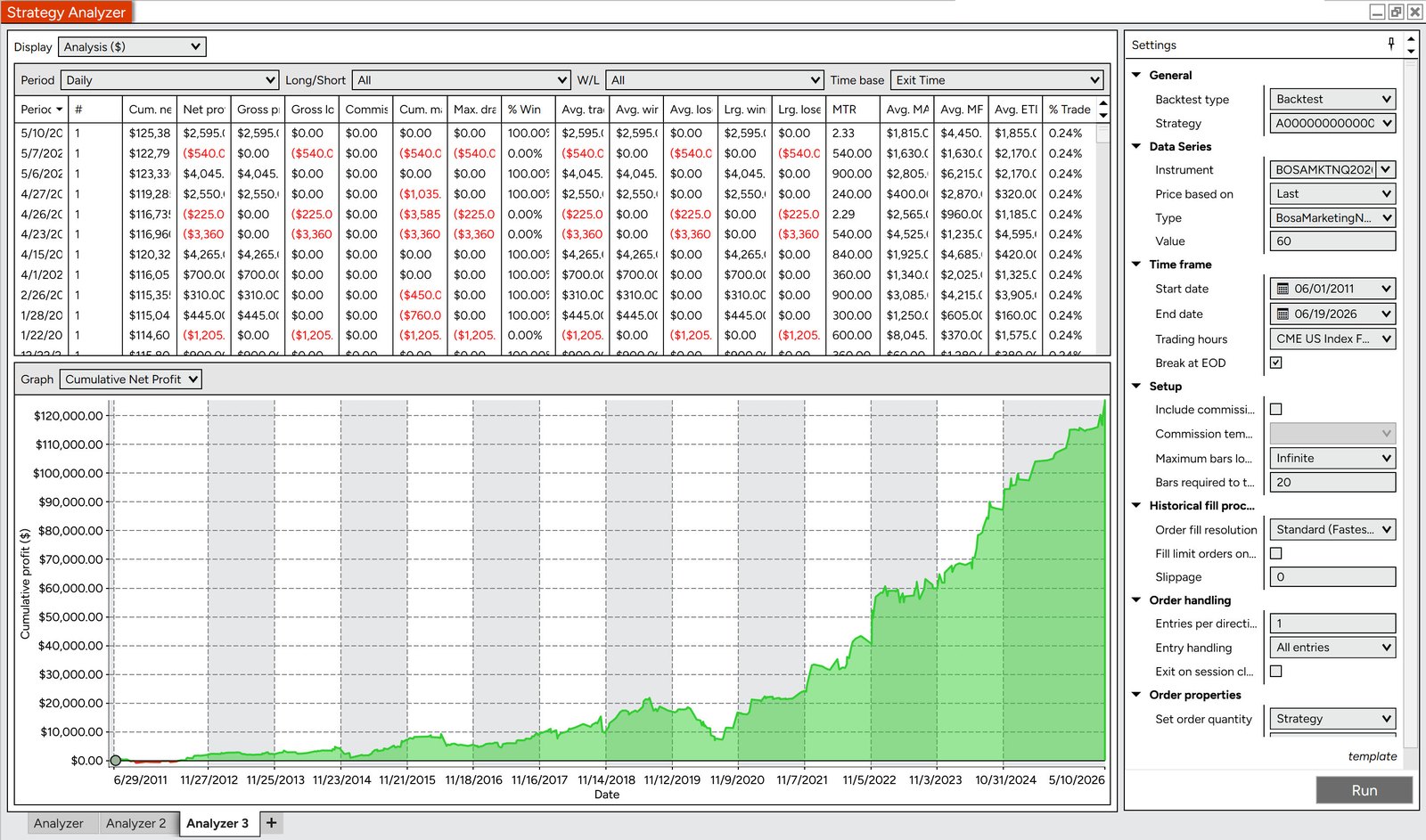
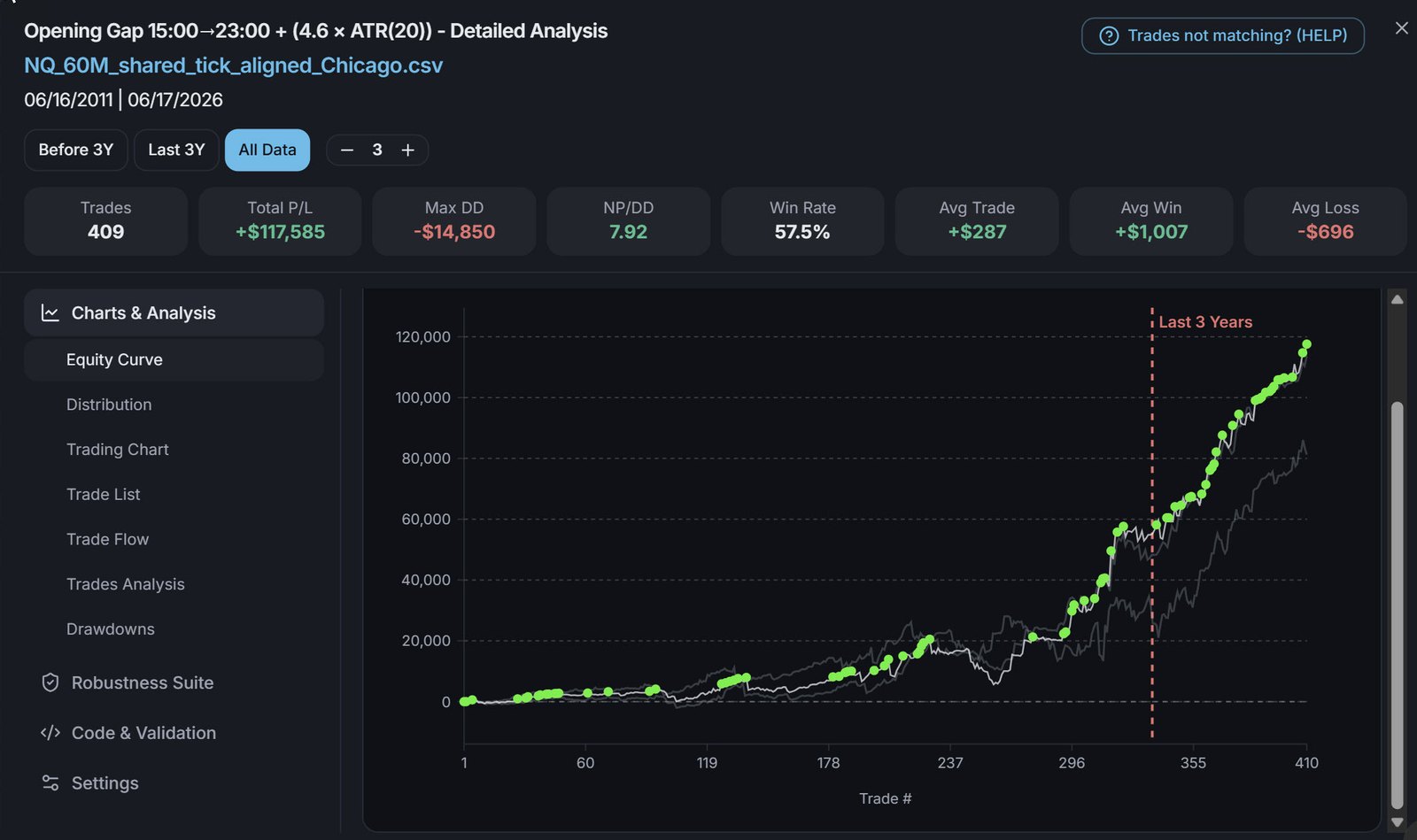
One strategy, backtested in BreakoutOS, then exported and backtested again in NinjaTrader's Strategy Analyzer. The NinjaScript export reproduces the BreakoutOS results closely, so the strategy you researched is the one that ends up on your chart.
BreakoutOSNQ 60-min · Opening Gap
BreakoutOS backtest of an NQ 60-minute Opening Gap breakout strategy, 2011 to 2026Hypothetical backtest
NinjaTraderStrategy Analyzer · same strategy
NinjaTrader Strategy Analyzer running the exported NinjaScript of the same strategyHypothetical backtest
Same strategy, both platformsNQ 60-min · Opening Gap · Jun 2011 to Jun 2026 · 1 contract · no commission or slippage
MeasureBreakoutOSNinjaTrader
Trades409410
Win rate57.5%57.3%
Max drawdown-$14,850-$14,775
Net profit+$117,585+$125,385

NinjaTrader's net profit is about 6% higher, from small exit differences around holidays and shortened sessions. Hypothetical backtest results on both sides, not live trading. See the Hypothetical Performance Disclosure at the foot of this page.

Same rules

The entry, the exit and the filters you tested in BreakoutOS, written out as NinjaScript.

Same session times

Session and timezone settings are spelled out in the code header, so the trades land on the same bars.

Differences you can trace

Small gaps can still come from your data feed or session template. There's a guide inside BreakoutOS for tracking them down.

Bring your own strategy

Already built strategies in NinjaTrader?

Maybe you wrote them yourself, or NinjaTrader's AI Strategy Builder wrote them for you. A nice-looking backtest doesn't prove much, so import them into BreakoutOS Scale and put them through four tools.

01 · Audit

Backtest Auditor

Scores your strategy against a thousand strategies with the same DNA, across nine checks.

02 · Improve

Indicator Matcher

Finds out which indicators work best for your strategy.

03 · Combine

MQ Portfolio Builder

Combines several strategies into one portfolio, so you see how they work together.

04 · Monitor

Strategy Health Monitor

Gives each strategy a traffic light, so you know when to keep going and when to pause.
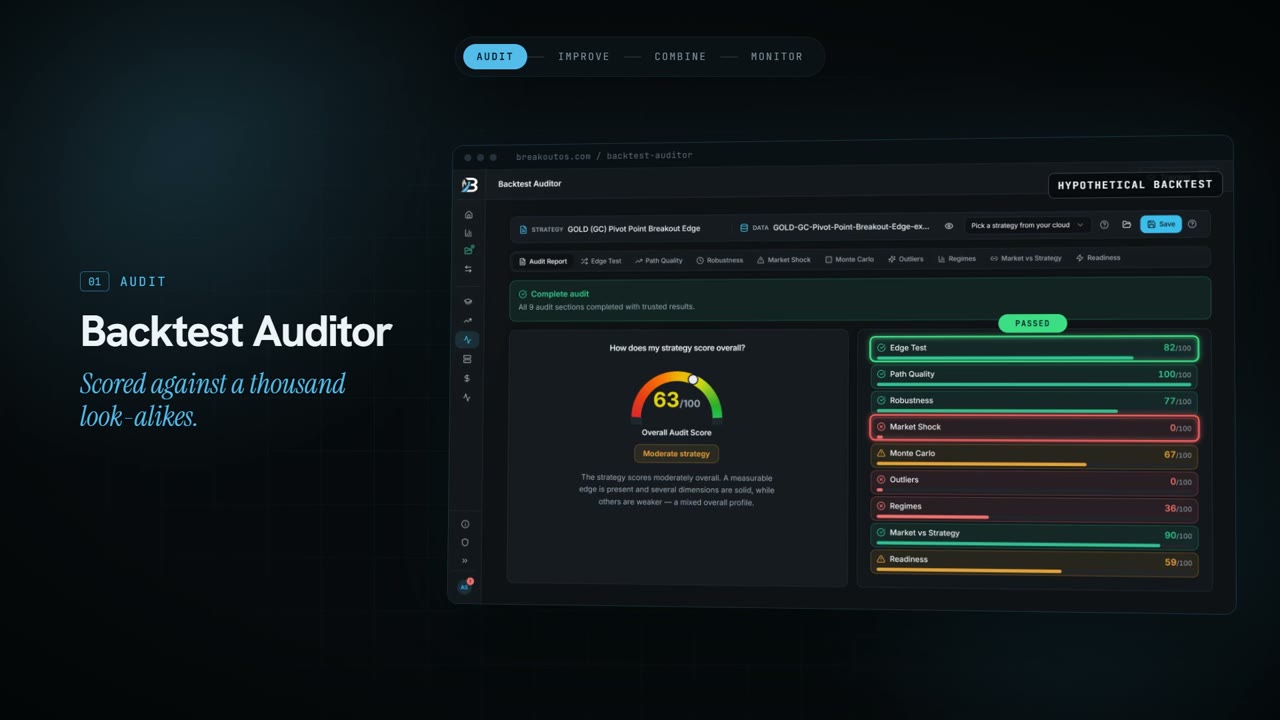
Backtest Auditor report with the nine checks
Alongside NinjaTrader

How BreakoutOS and NinjaTrader work together.

BreakoutOS does the research and the testing. NinjaTrader runs the strategy. Here's how the two fit together, from picking a market to monitoring a portfolio.

Build strategies
Implement
Prove and manage
01

Choose the market

Breakout Radar

Score each market and session for breakout potential.

Build
02

Build the strategies

Breakout Trading PRO

Generate tested strategy candidates, without code.

Build
03

Implement in NinjaTrader

NinjaScript export

Paste the NinjaScript into NinjaTrader, compile it and run it.

NinjaTrader
04

Audit the backtest

Backtest Auditor

Nine checks against a thousand look-alike strategies.

Scale
05

Improve it

Indicator Matcher

Find the indicators that work best for it.

Scale
06

Combine strategies

MQ Portfolio Builder

Several strategies, one portfolio.

Scale
07

Monitor them

Strategy Health Monitor

A traffic light for every strategy.

Scale

Works across most major markets

Futures US Stocks International Stocks Forex Crypto

BreakoutOS builds and tests breakout strategies on all of them. Which ones you trade in NinjaTrader depends on your account and data connection.

Common questions

NinjaTrader questions.

No. BreakoutOS runs in your browser, and there's no add-on to install in NinjaTrader. When a strategy's ready, you copy the NinjaScript, paste it into a new strategy in NinjaTrader and compile it.
Strategies run in NinjaTrader Desktop (NinjaTrader 8). NinjaScript strategies need the desktop platform, so the exported code won't run in NinjaTrader's web or mobile apps.
Yes. Every strategy you build in Breakout Trading PRO exports as a NinjaTrader 8 NinjaScript strategy. Once it's compiled, it runs in NinjaTrader Desktop like any other automated strategy: on a chart, in the Strategy Analyzer or on a simulation account.
The NinjaScript runs inside NinjaTrader Desktop, so it works on whatever connection your account uses, including the Rithmic connections many futures prop firms use. Each firm sets its own rules on automated trading, though, and some don't allow it on evaluation or funded accounts. Check your firm's rules before you run a strategy on one.
No. You build strategies point-and-click in BreakoutOS, and the export writes the NinjaScript for you. You copy it, paste it into NinjaTrader's NinjaScript Editor and compile. That's the only part that happens in NinjaTrader.
Very closely. BreakoutOS has a built-in parity checker, and we've tested thousands of strategies on each platform: every one matched at least 95%, and most match 98-99%. Small differences come from holidays, shortened sessions and platform-specific edge cases, and every strategy builder runs into them. The header of every export lists the settings to match, and there's a guide inside BreakoutOS for fixing discrepancies. Results on both sides are hypothetical backtests, not live trading.
A backtest shows how a set of rules would have traded past data, whichever platform runs it. On its own it can't tell you whether those rules found a real edge or were fitted to that history. That's what the Backtest Auditor checks: it scores your strategy against a thousand strategies with the same DNA, across nine checks, and shows you what the backtest is hiding. All results are hypothetical.
Any market you've got price data for. BreakoutOS tests on data you upload as ASCII or CSV, including data exported from NinjaTrader. Most NinjaTrader traders start with futures like the E-mini S&P 500 (ES), E-mini Nasdaq-100 (NQ), gold (GC) and crude oil (CL).
BreakoutOS comes with a few sample datasets for testing, including crypto and 60-minute data for NQ, ES, AAPL and EUR/USD. They're for trying things out. For strategies you plan to trade, use the data you'll trade on, exported from NinjaTrader. Data can differ between providers, so testing on the same data is what makes BreakoutOS and NinjaTrader line up. There are step-by-step instructions for exporting from NinjaTrader and importing into BreakoutOS.
Build is for building new breakout strategies. It has Breakout Radar, Market Mapper, Breakout Explorer and Breakout Trading PRO, with NinjaScript export on every strategy. Scale is for traders who already have strategies. It adds the Backtest Auditor, Indicator Matcher, MQ Portfolio Builder and Strategy Health Monitor, and includes every Build tool.
Build and Scale are memberships. You'll find the current prices and plans on the BreakoutOS Build and BreakoutOS Scale pages. NinjaTrader Desktop itself is free to download for charting, strategy backtesting and simulated trading.
Get started

Build your first strategy for NinjaTrader.

BreakoutOS Build has the four tools you need to go from a market to a strategy, with NinjaScript export on every strategy you build.

  • Breakout Radar
  • Market Mapper
  • Breakout Explorer
  • Breakout Trading PRO
See BreakoutOS Build  →
Already have strategies?

Scale your trading with NinjaTrader.

BreakoutOS Scale has the tools to audit, improve, combine and monitor the strategies you've already got, plus every Build tool.

  • Backtest Auditor
  • Indicator Matcher
  • MQ Portfolio Builder
  • Strategy Health Monitor
See BreakoutOS Scale  →
NinjaTrader

Don't have NinjaTrader yet?

NinjaTrader Desktop is free to download for charting, strategy backtesting and simulated trading. You'll need it to compile and run the NinjaScript BreakoutOS exports.

Download NinjaTrader free

Affiliate link. We may earn a commission if you open a NinjaTrader account through it.

NinjaTrader® is a registered trademark of NinjaTrader Group, LLC. No NinjaTrader company has any affiliation with the owner, developer, or provider of the products or services described herein, or any interest, ownership or otherwise, in any such product or service, or endorses, recommends or approves any such product or service.