MultiCharts vs TradeStation (2026): Which Should You Use?

Platform comparisons

Platform comparison

MultiCharts vs TradeStation

MultiCharts and TradeStation are close relatives: MultiCharts' PowerLanguage runs most EasyLanguage code. The real differences are brokers and data, cost, and portfolio testing. BreakoutOS exports strategies to both. Here's an honest side-by-side.

Checked against each platform's published information in November 2026. Prices and features change, so check their sites for the latest before you decide.

The short answer

Which one should you use?

Choose MultiCharts if...

  • You want to choose your own broker and data feed
  • You already have EasyLanguage strategies and want more broker choice
  • You want to backtest portfolios of strategies together

Choose TradeStation if...

  • You want platform, data and brokerage in one account
  • You trade stocks and options as well as futures
  • You'd rather not pay a separate platform license
At a glance

Three key differences.

Brokers and data

MultiCharts

Connects to many brokers and data feeds, including Interactive Brokers, Rithmic, CQG, IQFeed and TradeStation. No brokerage of its own.

TradeStation

Platform, market data and brokerage all come in one TradeStation account.

What it costs

MultiCharts

A free plan for simulated trading and backtesting. Standard and Advanced plans by subscription, from $99 a month, or a lifetime license.

TradeStation

The desktop platform is free with a TradeStation account. Commissions depend on the account plan.

How you code a strategy

MultiCharts

PowerLanguage, which runs most EasyLanguage code. MultiCharts .NET uses C# or VB.NET instead.

TradeStation

EasyLanguage, including the newer object-oriented EasyLanguage.

Feature by feature

MultiCharts and TradeStation side by side.

FeatureMultiChartsTradeStation
Best known forChoosing your own broker and data feed, and portfolio backtestingStocks, options and futures in one account, and EasyLanguage
BrokerageNone. Connects to brokers such as Interactive Brokers, Rithmic, CQG and TradeStationTradeStation's own: US stocks, ETFs, options, futures and futures options
Market dataYour choice of feed, including IQFeed, Rithmic, CQG, dxFeed and TradeStationTradeStation data, with the account
Platform costFree plan for simulated trading and backtesting. Standard and Advanced plans by subscription (from $99/month) or a lifetime licenseDesktop platform free with a TradeStation account. Commissions depend on the account plan
Strategy languagePowerLanguage (EasyLanguage-compatible), or C# and VB.NET in MultiCharts .NETEasyLanguage
Existing EasyLanguage codeImports most EasyLanguage files. Object-oriented EasyLanguage and protected files aren't supportedRuns all EasyLanguage, including object-oriented
Backtesting and optimizationStrategy Performance Report, genetic optimization, Monte Carlo and Bar Magnifier. Walk-forward on the Advanced planStrategy Performance Report, optimization, and the Walk-Forward Optimizer with Monte Carlo
Testing different strategies as one portfolioPortfolio Trader, on the Advanced planPortfolio Maestro, a paid add-on
ScanningMarket ScannerRadarScreen, up to 1,000 symbols
DesktopWindows only (Mac users run it in a Windows virtual machine)TradeStation 10 on Windows for strategies and backtesting. TITAN X (launched 2026) runs on Windows and Mac, without backtesting so far. Plus web and mobile apps
Prop firmsSome firms that run on Rithmic or CQG. Check with your firmRarely offered
Free trial30 daysSimulated trading with an account

Prices and features as of November 2026. Check MultiCharts' plans and TradeStation's pricing for current prices and fees.

Credit where it's due

Where each platform shines.

Where MultiCharts shines

  • Your broker, your data. Connect the broker and data feed you want, and change them later without changing platforms.
  • Portfolio Trader. On the Advanced plan, backtest and run many strategies across many symbols as one portfolio.
  • EasyLanguage friendly. Most EasyLanguage code imports straight into PowerLanguage, so existing strategies come with you.
  • Bar Magnifier. Replays each bar at tick or minute level, for more realistic fills in your backtests.

Where TradeStation shines

  • One account for everything. Stocks, ETFs, options and futures sit side by side, which suits traders who don't only trade futures.
  • EasyLanguage. It's one of the easiest strategy languages to read and learn, and decades of EasyLanguage strategies and books are out there.
  • Scanning and portfolios. RadarScreen watches up to 1,000 symbols, and Portfolio Maestro (an add-on) backtests several strategies together.
  • A long track record. TradeStation has been a home for system traders for decades, with deep historical data built in.
Tested on both

One strategy, both platforms.

We built one breakout strategy in BreakoutOS, exported it as PowerLanguage and as EasyLanguage, and backtested it on each platform. Both reproduced the BreakoutOS results closely.
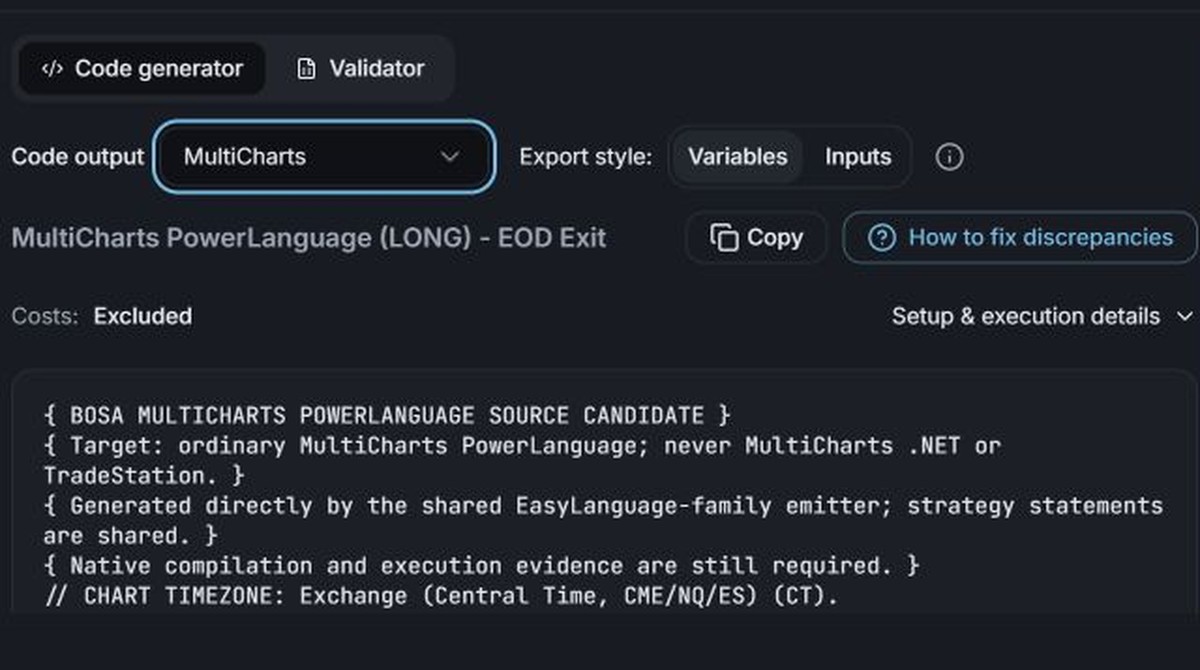
01Export the code
BreakoutOS PowerLanguage export of the strategy, with the Copy button
The strategy as PowerLanguage for MultiCharts
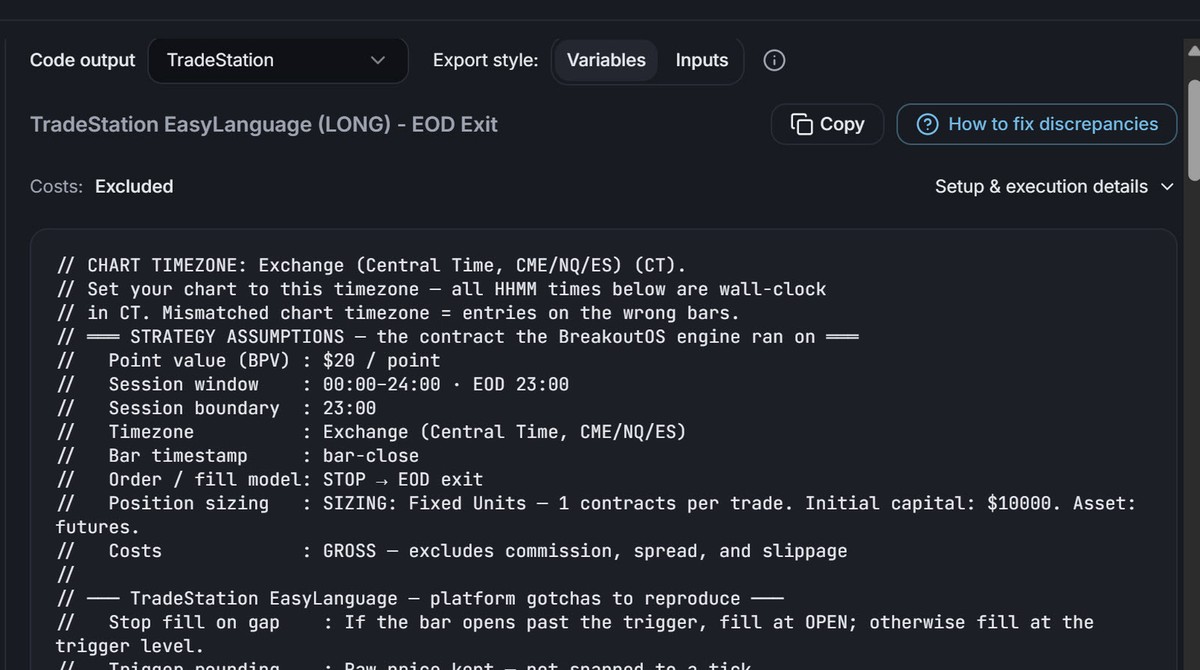
BreakoutOS EasyLanguage export of the strategy, with the Copy button
The same strategy as EasyLanguage for TradeStation
02Backtest it on each platform

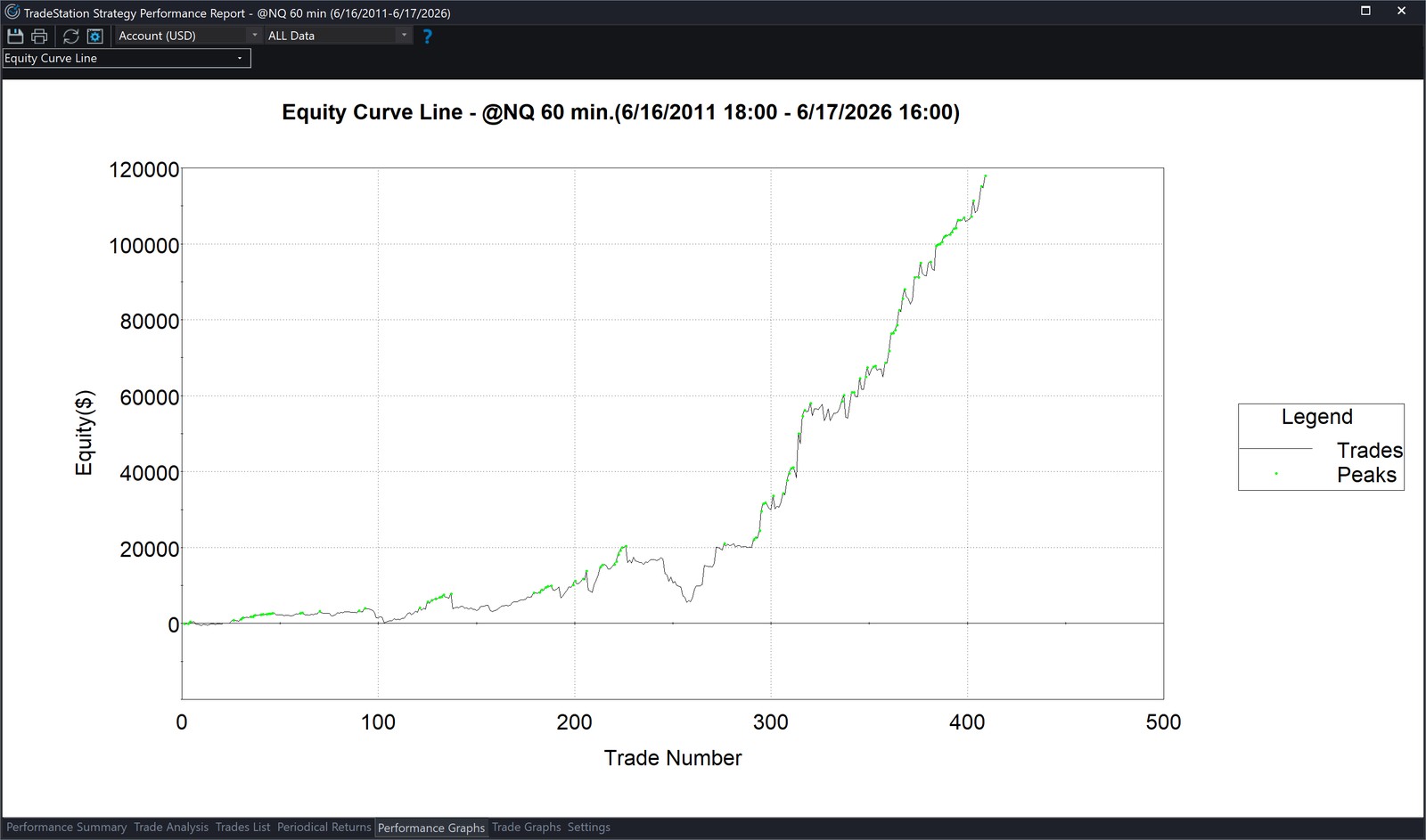
NQ 60-min · Opening Gap · Jun 2011 to Jun 2026 · 1 contract
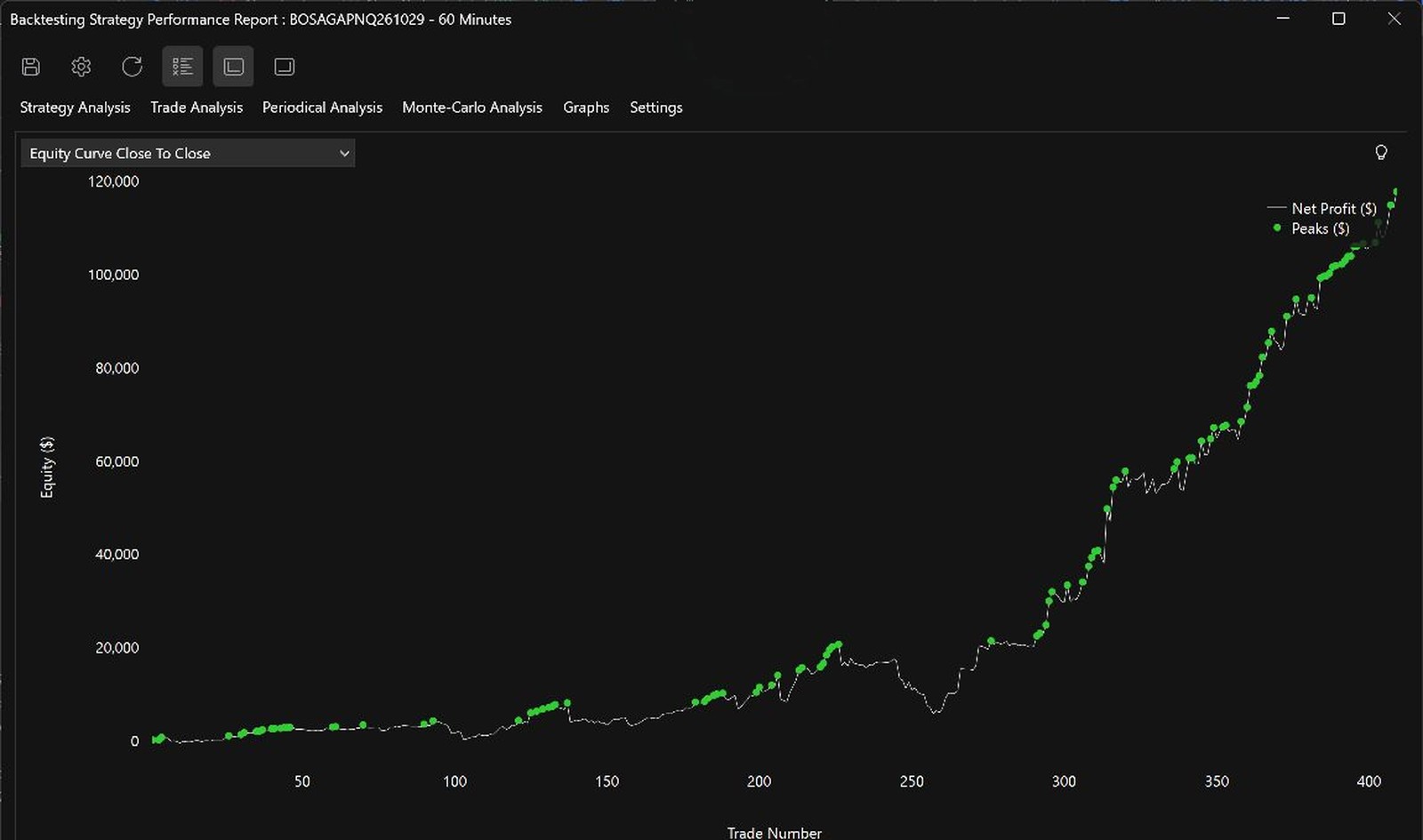
MultiCharts Strategy Performance Report equity curve for the exported PowerLanguage of the same strategyHypothetical backtest
MultiCharts 410 trades, 57.6% winners
TradeStation Strategy Performance Report equity curve for the exported EasyLanguage of the strategyHypothetical backtest
TradeStation 409 trades, 57.7% winners

BreakoutOS's own backtest had 409 trades and 57.5% winners. All 409 BreakoutOS trades match MultiCharts exactly; its one extra trade comes from when it resets its one-entry-a-day count. Hypothetical backtest results, not live trading. Full results on the MultiCharts and TradeStation pages.

Click any screenshot to see it up close
Whichever you choose

What BreakoutOS adds to either platform.

MultiCharts and TradeStation both test and run the strategy you give them. BreakoutOS does the jobs around that, and the strategy you build moves with you if you ever switch.

Before you build

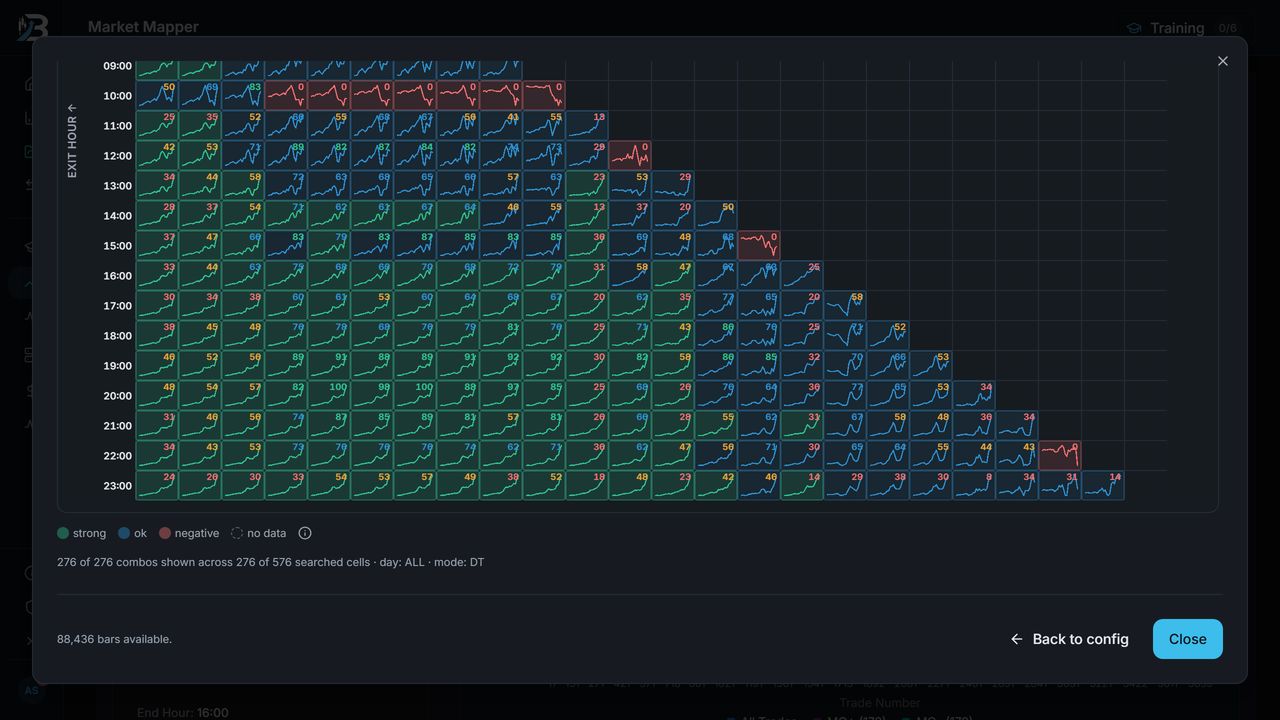
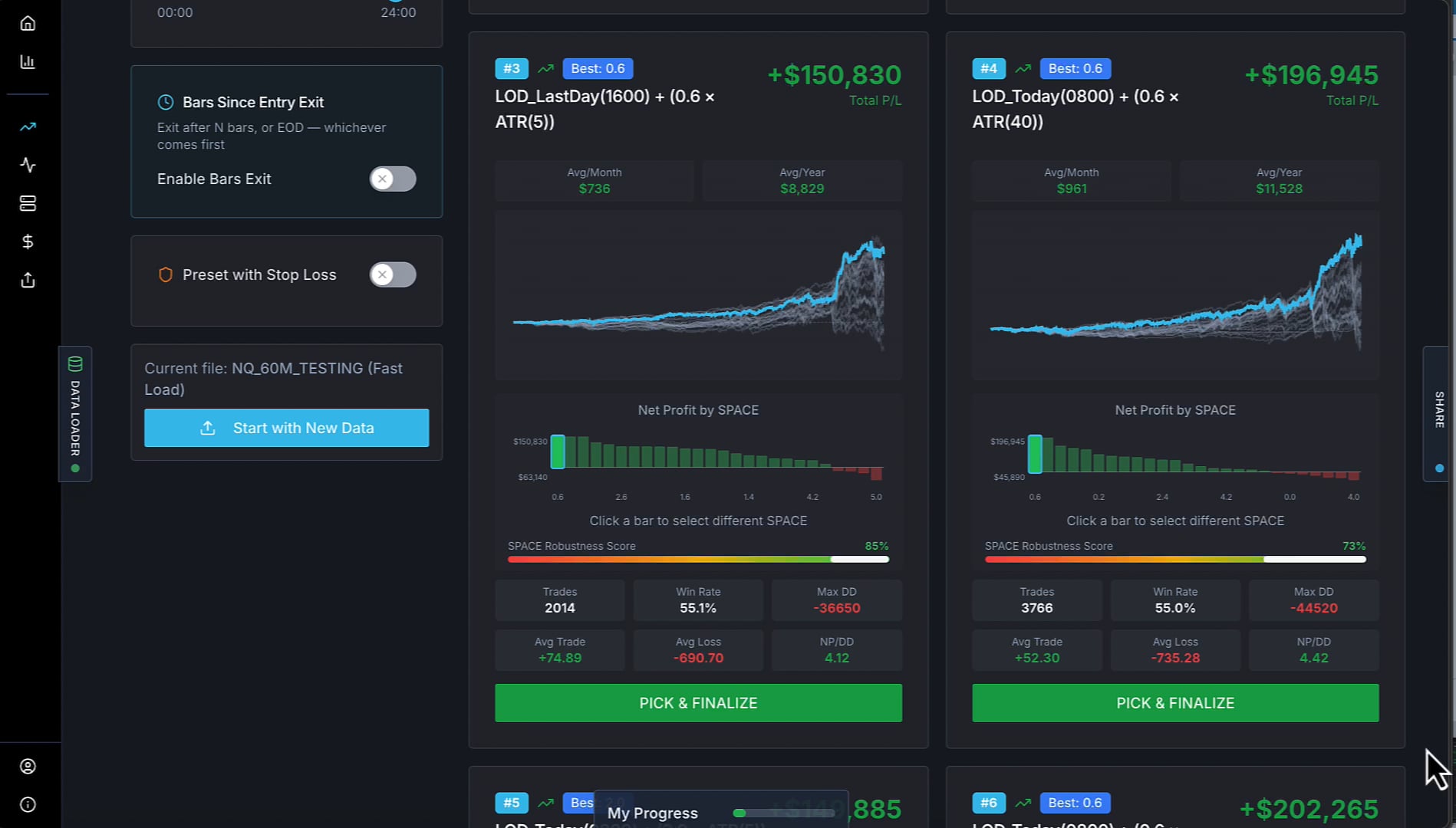
Breakout Radar and Market Mapper show which markets and sessions break out cleanly, and Breakout Trading PRO builds and tests thousands of breakout strategies in minutes, then exports the one you pick as PowerLanguage or EasyLanguage.
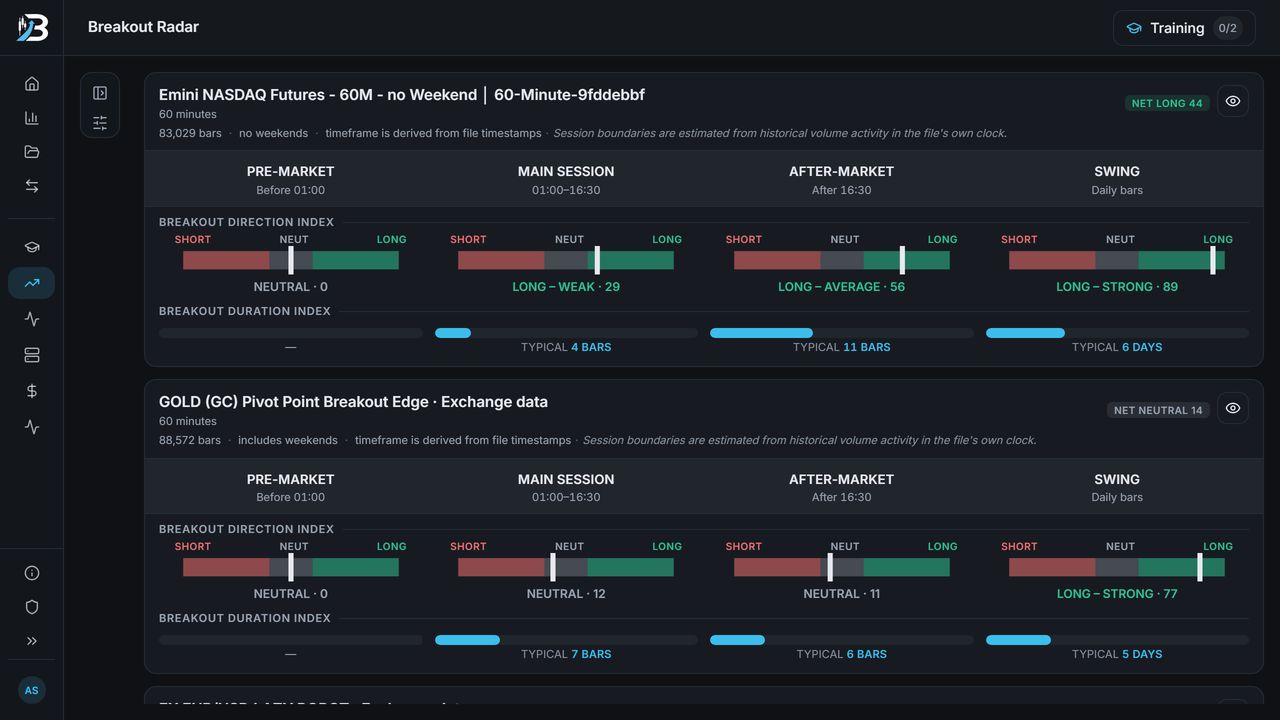
Breakout Radar scoring each session of a market for breakout direction and duration
Breakout Radar
Market Mapper grid scoring every entry and exit hour for a market (hypothetical backtests)
Market Mapper
Breakout Trading PRO building and ranking breakout strategies (hypothetical backtests)
Breakout Trading PRO

Screenshots show hypothetical backtests.

After the backtest

The Backtest Auditor checks whether a result beats a thousand strategies with the same DNA, MQ Portfolio Builder combines strategies into one portfolio, and the Strategy Health Monitor tells you when a live strategy drifts outside its normal range.

Backtest Auditor overall score and its nine checks (hypothetical backtest)
Backtest Auditor
MQ Portfolio Builder combining strategies into micro-portfolios and a master portfolio (hypothetical backtests)
MQ Portfolio Builder
Strategy Health Monitor rating live strategies healthy, reduce or pause (hypothetical backtests)
Strategy Health Monitor

Screenshots show hypothetical backtests.

Go deeper

See BreakoutOS with your platform.

See everything BreakoutOS can do with MultiCharts or TradeStation.

See all platform comparisons →

Common questions

MultiCharts vs TradeStation questions.

No, but they're close. MultiCharts' PowerLanguage runs most EasyLanguage code, so strategies usually move across with little or no change. The big difference is that MultiCharts connects to many brokers and data feeds, while TradeStation puts the platform, data and brokerage in one account.
Mostly, yes. MultiCharts imports EasyLanguage files and runs most EasyLanguage studies. Object-oriented EasyLanguage and protected files aren't supported. BreakoutOS exports a separate PowerLanguage version of every strategy, so there's nothing to convert.
TradeStation's desktop platform is free with an account, and you pay commissions. MultiCharts has a free plan for simulated trading and backtesting, then charges for its Standard or Advanced plan by subscription or lifetime license, on top of your broker's commissions and any data fees. Check both pricing pages for current figures.
Yes. TradeStation is on MultiCharts' list of supported brokers and data feeds, so you can keep a TradeStation account and run your strategies in MultiCharts.
Both can backtest several strategies together. MultiCharts does it in Portfolio Trader on its Advanced plan. TradeStation does it in Portfolio Maestro, a paid add-on that runs outside the main platform.
MultiCharts is Windows only, so Mac users run it in a Windows virtual machine. TradeStation's new TITAN X platform runs on Mac, but strategy backtesting is still in TradeStation 10, which is Windows only.
Yes. BreakoutOS exports every strategy as PowerLanguage and as EasyLanguage. In our test, one NQ breakout strategy produced 410 trades in MultiCharts and 409 in BreakoutOS and TradeStation (hypothetical backtests).
Next steps
Get started

Build your next strategy for MultiCharts or TradeStation.

BreakoutOS Build has the four tools you need to go from a market to a strategy, with PowerLanguage and EasyLanguage export on every strategy you build.

  • Breakout Radar
  • Market Mapper
  • Breakout Explorer
  • Breakout Trading PRO
See BreakoutOS Build  →
Already have strategies?

Audit and combine the strategies you already run.

BreakoutOS Scale has the tools to audit, improve, combine and monitor your MultiCharts or TradeStation strategies, plus every Build tool.

  • Backtest Auditor
  • Indicator Matcher
  • MQ Portfolio Builder
  • Strategy Health Monitor
See BreakoutOS Scale  →

Disclosure: Breakout Trading Academy isn't affiliated with MultiCharts or TradeStation. Both platforms are compared on publicly available information as of November 2026.

MultiCharts and PowerLanguage are trademarks of MultiCharts, LLC. TradeStation and EasyLanguage are trademarks of TradeStation Technologies, Inc.